


MovieClip Transition Effects V3


|
flash content
Important note: This component is only available for purchase within the V3 Components pack which includes MCTE, Accordion Panel, Accordion Tree Menu, Drop Down Tree Menu, Color Picker Pro, Loader Pro and XML Slide Show (All V3, both AS2 and AS3). The V3 Components pack can be used freely for non-commercial purpose. Buy now for only $49 | Free download | Read more Latest update- We have launched FlashEff 2.0, including over 100 effect patterns similar to the MCTE Patterns, over 3000 prebuilt effects and lots of new features, that helps you save time while creating impressive Flash animations. Get FlashEff 2.0 now! Get FlashEff now!About MovieClip Transition Effect V3 (MCTE)Have you ever wanted to have a single easy to use MovieClip transition component that you could use to perform all possible transitions between 2 different states of a MovieClip or between 2 different MovieClips?The MCTE is a flash component that, used with any MovieClip will give you time saving show/hide transitions, faster transition through, transitions to, transitions from a specific state using customizable built-in patterns. Think about the MCTE V3 like a Square Effect, or Waves Effect prototype multiplied with lots of other state of the art patterns and presets for getting the coolest animations without any coding at all. But think about the MCTE like about a transition manager, it handles the transitions, but the transitions are based on its patterns (9 patterns are included, but the MCTE doesn't stop here). The MCTE is the ONE and ONLY component that you need to perform the most script generated transitions without scripting, some patterns might have custom parameters that can be customized, but, you can change patterns and presets, usually, without the need to change the code or anything. Once you have used MCTE for animating In and Out a single MC, you will want to use it for all possible transitions. Using MCTE you will reduce interminable frame animations that take a lot of time to make, into single frame animation that is done in seconds, and hey, if you like to change the pattern, preset or params, it can be done by a blink of an eye. Features
CompatibilityIDE Version: Macromedia Flash 8, Adobe Flash CS3Action Script Version: AS2.0, AS3.0 Flash Player Version: Flash Player 8, Flash Player 9 + The story of the MCTE V3We wanted to help flash users to make show/hide MovieClip animations without knowing to code, in a fast reliable way. After we released the Square Effects component we started to think about a component that will be used for all possible transitions between 2 different states of a MovieClip and we came up with the idea of THE MovieClip Transition Effect (MCTE).With lots of patterns, having their own presets, with some customParams, a general Gain parameter, and with customizable tweening, MCTE V3 is simply the most easy to use, the most customizable transition effect ever. We are currently developing other cool effects for the MCTE so all previous customers will not need to learn new component models after using MCTE. Once you understand how MCTE works, you can use it for all your animations, both frame animations, and dynamic animations, and change the patterns and presets at a blink of an eye. The mass preorder rate that MCTE encountered convinced us to develop further patterns and packages (Both AS2.0 and AS3.0) and to improve the MCTE in order to fulfill your needs; this is why we want to assure you that working with the MCTE will be an easy job. MCTE Transition Types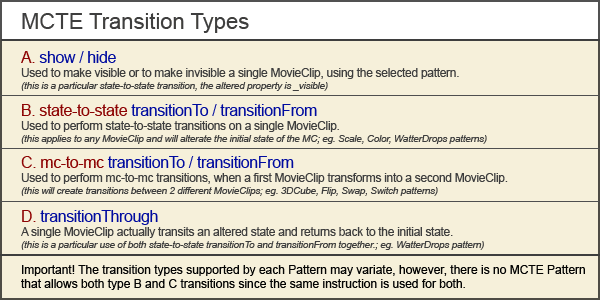 MCTE together with Loader Pro V3Loader Pro V3 supports MCTE transitions on loading content. When the content is loaded, if an instance of MCTE V3 is attached to it (by drag&drop over), based on the MCTE setup, the Loader Pro V3 will perform show transitions or even transition between MovieClips for some custom patterns. (e.g. FlipOver, 3DCube patterns)When using the Loader Pro V3 with MCTE transitions, in order to perform the appear transition of the loaded content you need to select the loader's transitionType parameter to "MCTE" or "MCTEfade". Custom PatternsThe MCTE internal API allows us to further develop and sell patterns separately, all you have to do in order to use them as patterns for the MCTE instances, is to drag them inside your project library and use their name as values for the customPattern parameter of the MCTE.As stated before, we sell patterns that are not initially included inside the MCTE. You can purchase those patterns without the MCTE, but they will be useless without it. We also do develop patterns for direct customers, who want a special custom developed pattern for a specific transition. In order to get a custom developed pattern just send us an email. Updates13 July 2007 - MCTE V3 and Loader Pro V3 update containing new functionality for crossfading the Loader's contents with MCTE transitions.In order to get the Updates/Fixes, you need to download the full product from your member download area. (free trials are also updated, older demos are not updated unless the demonstrated functionality needed to). TutorialsHelpProperties | Methods | Events | Built in Patterns | XML | Data Model Diagram
How to use the MCTEIt's easy, it's fast and it's reliable. There are 2 different modes you can add the MCTE to a MovieClip or to a Loader Pro V3.
UI AccessMCTE V3 can be accessed from Components panel under V3 Components – Jumpeye.MCTE Patterns
Order Now! |












