
My account  |  Support  |  Shopping Cart
Jumpeye Components, V3 Flash Components, Flash Components Pro, Flash V3 Components

MCTE V3 3D Cube

v3  flash_8  flash_cs3  as20  as30 

home » flash components » skins and patterns » mcte v3 3d cube »


flash component0

Buy Now

This item cannot be purchased separately. To get this MCTE pattern you need to purchase one of the following products:
MCTE Collection Plus MCTE Collection Plus Contains the MCTE V3, the Loader Pro V3x and 21 additional MCTE Patterns
Add to cart $ 199
MCTE Pattern Collection MCTE Pattern Collection Contains a collection of 21 new MCTE Patterns.
Add to cart $ 169


About

The 3D Cube MCTE Pattern is designed for MC to MC transition. This is a iMac/iPhone style transition that uses customizable transition, duration and focal perspective. You can create transitions very easy using a Loader Pro V3 component and the MCTE V3 transition along with the MCTE 3D Cube, and simple change the contentPath of the Loader Pro V3 to flip the cube to a different content.

Important! In order to use all these included MCTE V3 patterns, you need to have the MCTE V3 component too, since it is the component that handles the transitions, you can purchase MCTE V3 here. Also you may want to order the Loader Pro V3 too, along with the MCTE and these patterns.


Compatibility

ActionScript: 2.0, 3.0
Flash IDE: Flash 8, Flash CS3
FlashPlayer: FlashPlayer 8, FlashPlayer 9


Working with Custom Patterns

The MCTE internal API allows us to further develop and sell patterns separately, all you have to do in order to use them as patterns for the MCTE instances, is to drag them inside your project library and use their name as values for the customPattern parameter of the MCTE.

As stated before, we sell patterns that are not initially included inside the MCTE. You can purchase those patterns without the MCTE, but they will be useless without it.

We also do develop patterns for direct customers, who want a special custom developed pattern for a specific transition. In order to get a custom developed pattern just send us an email.


3D Cube Pattern Description
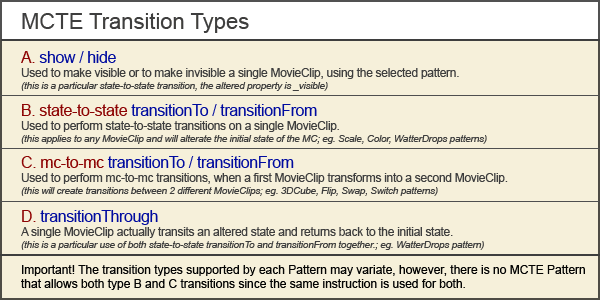
MCTE Transition Types


This pattern is very similar to MCTEPatternFlip but uses the cube perspective instead of the slice perspective. Supports only transitionTo/transitionFrom (C), and requires 2 movieclip instances to create the transition.

CustomParams

        •   customParam1:String - the instanceName of the "flipTo" movieclip (the instanceName of the "flipFrom"
            movieclip is the one that is used as _targetInstanceName, or the previous customParam1). The
            customParam1 will be turned invisible automatically (if was not set before to _visible=false (AS2) or
            visible=false (AS3)) this happens just before the onTransitionStart event. The transitionFrom does the
            transitionTo in reverse order.
        •   customParam2:String ("true" or "false") - Optional, if "true", will refresh active targets on every frame,
            slowest, but very important for animated movies or videos.
        •   customParam3:String ("true" or "false") - Optional, if "false", will not unhide the flipped movieclip after
            rotation. This movieclip is hidded during the rotation, because the 3DCube actually takes a snapshot (or
            multiple snapshots) of it during the rotation, but the movieclip itself is not rotated.

Quick Tip

Use the Loader Pro V3 and flip through the loaded content both external and internal movies/movieclips (images, flash movies, video). Create iPhone, iMac interface flip effect like, as shown in the demo. When working with Loader Pro V3, the 3D Cube will not take effect on the first loaded image, since it is the only one cube side, and the cube needs at least 2 sides to flip. In order to use this transition with loader, you have 2 options:

        •   change the loader’s transitionType to MCTE only after you load the first content with alpha or fade
            transitionType.
        •   use MCTE transitionType from the beginning, but do not use the 3DCube pattern for the first image,
            change the MCTE.patternName=”3DCube” from script after the loader loads it’s first content.


Presets

Random String value:
random : uses a random preset each time depending on the customParams that are set, if one preset requires more customParams that are already set, the random filter will avoid it.

Number values:
1: left to right
2: right to left
3: top to bottom
4: bottom to top

User rating:
Date: 20-07-07

User Comments

sucks!
posted by eliteproxy on 08-08-07

no properties i need to download something extra .. way too confusing. Come one people when you make a component at least have parameters for that specific component.. lear from Flashloaded
MCTE V3 3D Cube pattern
posted by jumpeyecomponents on 08-08-07

The MCTE V3 3D Cube is a pattern for the MCTE V3 component. We've choosed to create a MovieClip Transition Effect which already have inluded transitions inside but we also want to develop new patterns for it without having to change the main component. That's why we are selling these patterns separately. You purchase once the MCTE V3 and add patterns all the time. It's simple. You can also download trials to see how this component works.....
However, thank you for your suggestion, we're learning all the time...so if you have any other suggestions, please write an e-mail to our support departament. Thank you
Confusing
posted by thirdmotion on 10-08-07

Yes, ineed is very confusing..


Menu

Special Offer

Special Offer - All in one Jumpeye Components bundle!

Get the JC Master Collection Now!

Free Trial Versions

The trial versions do have a major limitation. They will ONLY run into debugger flash player versions, such as the Flash IDE player and the activeX FP used by developers.

Switch from Free Trial version to Full version.

You can switch from Trial to Full versions in a blink of an eye.
See this tutorial in order to find out how.

We accept Google Checkout

Google Checkout Acceptance Mark

Secured by VeriSign








