


MCTE V3 Clouds


|
flash component0
Important note: This pattern is only available for purchase within the V3 Components pack which includes MCTE, Accordion Panel, Accordion Tree Menu, Drop Down Tree Menu, Color Picker Pro, Loader Pro and XML Slide Show (All V3, both AS2 and AS3). Buy now for only $99 | Download trial | Read more AboutThe Clouds MCTE Pattern is designed to create transitions with a burning cloud effect, just like clouds obscure the sky. It can be used for show/hide transitions, but it doesn't support MC to MC transitions. The pattern also can be used as a transition effect for the Loader Pro V3. This pattern offers you the possibility to create slide shows that would impress your viewers.Important! In order to use this MCTE V3 pattern, you need to have the MCTE V3 component too, since it is the component that handles the transitions. You need at least the 3.1.0 version of MCTE V3, you can purchase MCTE V3 here. If the MCTE that you already have is not running with this pattern you need to redownload it from www.jumpeyecomponents.com - my account - my downloads area. Also you may want to order the Loader Pro V3 too, along with the MCTE and this pattern. CompatibilityActionScript: 2.0, 3.0Flash IDE: Flash 8, Flash CS3 FlashPlayer: FlashPlayer 8, FlashPlayer 9 Working with Custom PatternsThe MCTE internal API allows us to further develop and sell patterns separately, all you have to do in order to use them as patterns for the MCTE instances, is to drag them inside your project library and use their name as values for the customPattern parameter of the MCTE.As stated before, we sell patterns that are not initially included inside the MCTE. You can purchase those patterns without the MCTE, but they will be useless without it. We also do develop patterns for direct customers, who want a special custom developed pattern for a specific transition. In order to get a custom developed pattern just send us an email. Clouds Pattern Description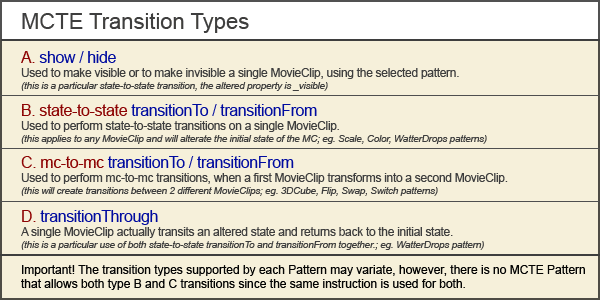
Supports show/hide (A) transitions. Working with Loader Pro V3, supports MCTE and MCTEfade loader transitionTypes. The gain parameter isn't used at this pattern. The tweenDuration parameter is used to set the duration of a square transition; it represents a number of frames. CustomParams
Quick Tip Use the Loader Pro V3 and create stunning slide shows with the burning cloud effect. Presets - |












