MCTE Pattern Flip
flash component0
MCTE Pattern Flip Bars
flash component1
MCTE Pattern Flip Square
flash component2
Important note: This pattern is only available for purchase within the V3 Components pack which includes MCTE, Accordion Panel, Accordion Tree Menu, Drop Down Tree Menu, Color Picker Pro, Loader Pro and XML Slide Show (All V3, both AS2 and AS3).
Buy now for only $99 | Download trial | Read more
About
This package includes 3 flip animation patterns: the Flip pattern (MCTEPatternFlip), the Flip Bars pattern with custom sized flipping bars (MCTEPatternFlipBars) and the Flip Square pattern that performs almost similar to the Square effects, but uses flipping animations (MCTEPatternFlipSquare).
Important! In order to use all these included MCTE V3 patterns, you need to have the MCTE V3 component too, since it is the component that handles the transitions, you can purchase MCTE V3 here. Also you may want to order the Loader Pro V3 too, along with the MCTE and these patterns.
Compatibility
ActionScript: 2.0, 3.0
Flash IDE: Flash 8, Flash CS3
FlashPlayer: FlashPlayer 8, FlashPlayer 9
Working with Custom Patterns
The MCTE internal API allows us to further develop and sell patterns separately, all you have to do in order to use them as patterns for the MCTE instances, is to drag them inside your project library and use their name as values for the customPattern parameter of the MCTE.
As stated before, we sell patterns that are not initially included inside the MCTE. You can purchase those patterns without the MCTE, but they will be useless without it.
We also do develop patterns for direct customers, who want a special custom developed pattern for a specific transition. In order to get a custom developed pattern just send us an email.
Flip Pack Pattern List
| Pattern |
Description/Value : Preset |
| Flip |
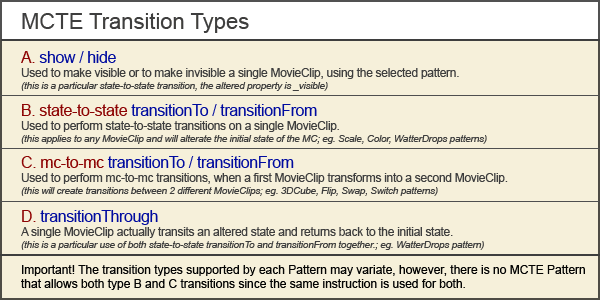
Differs very much from the other 2 included Patterns, since the Flip pattern can flip a MovieClip into another MovieClip, creating a mc to mc transition.
Supports transitionTo/transitionFrom (C) and show/hide (A) transitions.
CustomParams
- customParam1:String - Optional, only for transitionTo types, customParam1 is the instanceName of the "flipTo" movieclip (the instanceName of the "flipFrom" movieclip is the one that is used as _targetInstanceName, or the previous customParam1). The customParam1 will be turned invisible automatically (if was not set before to _visible=false (AS2) or visible=false (AS3)) this happens just before the onTransitionStart event. The transitionFrom does the transitionTo in reverse order.
- customParam2:String (numerical value) - focal length (values from "0" to "100"; default:"100")
- customParam3:String ("true" or "false") - if "true", will refresh active targets on every frame, slowest, but very important for animated movies or videos.
Quick Tip
Use the Loader Pro V3 and flip through the loaded content both external and internal movies/movieclips (images, flash movies, video). Create iPhone, iMac interface flip effect like, as shown in the demo.
Using the MCTE V3 and the Loader Pro V3 together, you'll find this easiest than anything else. Just drop the Loader Pro V3 onto the Stage, set it's transitionType to "MCTE", drag the MCTE V3 over it, make sure the Flip pattern is in your library, set the customParam of the MCTE to "Flip" and all you have to do now, is load content into the loader. The loader will handle the transitions using the MCTE seamless.
Presets
Random String value:
random : uses a random preset each time depending on the customParams that are set, if one preset requires more customParams that are already set, the random filter will avoid it.
Number values:
1 : left to right
2 : right to left
3 : top to bottom
4 : bottom to top |
| FlipBars |
Very similar to the FlipSquare but it does bars only, this effect can be obtained with FlipSquare indeed, but you need to calculate the width or height of the "square" to get a full length bar instead, also you need to use a preset that does the type of transition that will look good on bars.
Supports only show/hide (A) transitions. But used along with the Loader Pro V3, it will make MCTE (and MCTEfade) transitions over the previous content so it will seem to be a full transitionTo (C) not only a show/hide (A) transition.
gain:delay between 2 bars (in miliseconds)
CustomParams
- customParam1:String (numerical value) - bars height in pixels (the length of the bars will be deducted from the width or height of the movieclip/loader content depending on the orientation used by the used preset)
- customParam2:String ("true" or "false") - absolute reverse flip item direction
- customParam3:String ("true" or "false") - relative reverse flip out, (flip hide) item direction, relative to customParam3
- customParam4:String (numerical value) - focal length (values from "0" to "100"; default:"100")
Quick Tip
Using this pattern you can easy turn advertising flash movies into real advertising flipping panels, looks very similar.
Presets
Random String value:
random : uses a random preset each time depending on the customParams that are set, if one preset requires more customParams that are already set, the random filter will avoid it.
Number values:
1 : vertical, left to right, x axis
2 : vertical, right to left, x axis
3 : vertical, left to right, y axis
4 : vertical, right to left, y axis
5 : vertical, random, x axis
6 : vertical, random, y axis
7 : horizontal, top to bottom, x axis
8 : horizontal, bottom to top, x axis
9 : horizontal, top to bottom, y axis
10 : horizontal, bottom to top, y axis
11 : horizontal, random, x axis
12 : horizontal, random, y axis |
| FlipSquare |
Performs square effects on different patterns, similar to the included SquareScale pattern.
Supports only show/hide (A) transitions. But used along with the Loader Pro V3, it will make MCTE (and MCTEfade) transitions over the previous content so it will seem to be a full transitionTo (C) not only a show/hide (A) transition.
gain: delay between 2 series of squares (in miliseconds)
CustomParams
- customParam1:String (numerical value) - square width in pixels
- customParam2:String (numerical value) - square height in pixels
- customParam3:String ("true" or "false") - absolute reverse flip item direction
- customParam4:String ("true" or "false") - relative reverse flip out, (flip hide) item direction, relative to customParam3
- customParam5:String (numerical value) - focal length (values from "0" to "100"; default:"100")
Quick Tip
Use Thumbnail Slider V1 + Loader Pro V3 + MCTE V3 + this pattern and create a unique gallery/navigation page.
Presets
Random String value:
random : uses a random preset each time depending on the customParams that are set, if one preset requires more customParams that are already set, the random filter will avoid it.
Number values:
1 : top to bottom, x axis
2 : bottom to top, x axis
3 : left and top to right and bottom, x axis
4 : right and bottom to left and top, x axis
5 : right and top to left and bottom, x axis
6 : left and bottom to right and top, x axis
7 : top to bottom, y axis
8 : bottom to top, y axis
9 : left and top to right and bottom, y axis
10 : right and bottom to left and top, y axis
11 : right and top to left and bottom, y axis
12 : left and bottom to right and top, y axis
13: random, x axis
14: random, y axis
|
|














