


Applying themes to the Color Picker tutorial
home » flash components » user interface » color picker pro v3 » applying themes to the color picker tutorial »
1. You have to complete the “Create a simple Color Picker” tutorial before continuing with this one.
2. Open Macromedia Flash, create a new file (File/New/Flash Document) and drag an instance of the Color Picker component on the stage. Install the theme that you bought (I’ve installed the CPThemeBlackVelvet) from the mxp file. If you have troubles installing the mxp file, please read the How to install a MXP file tutorial.
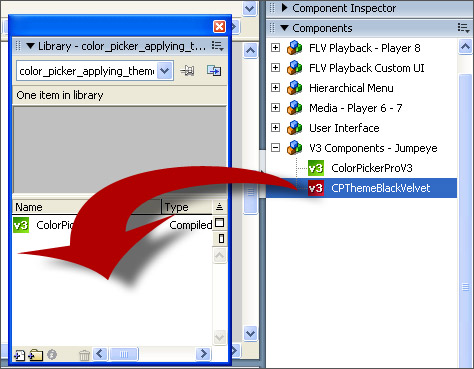
3. Drag the theme from the Components panel to your library :
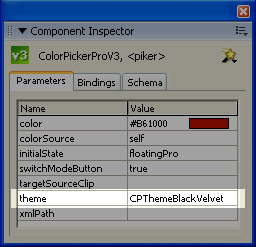
4. At the theme parameter, in the Parameters tab from Component Inspector, insert the theme name that you’ve just installed :
5. Hit Ctrl+Enter to test your movie (or Command+Enter on Mac):
Download the source files for this tutorial












